
Wix vs Squarespace (2026): Which Website Builder Is Best for Your Small or Service-Based Business?

Wix and Squarespace are the two website builders small business owners compare most often, and for good reason. Both are all-in-one platforms. Hosting, security, templates and SEO settings are included, and neither needs you to write code.
Where they differ is design freedom, built-in features and room to grow, and those are what decide which one suits your business.
The short answer: for most small and service-based businesses, Wix is the stronger choice. It offers more design flexibility, bookings built in, and the features to expand your website as your business grows, all at a similar price to Squarespace, so you get more value for your money. Squarespace can suit a simple, visual website, such as a portfolio, that won't need to change much.
This guide compares the two on what matters most to small businesses: design and first impressions, getting found on Google and AI search, built-in business tools, cost, ease of use and upkeep, advanced features and room to grow, speed and reliability, and selling products online. It also covers what to consider if you're already on Squarespace. It's based on our experience designing websites for small businesses across Wix Classic, Wix Studio, Shopify and other platforms over many years.
Key Takeaways
|
Wix vs Squarespace at a glance
Area | Wix | Squarespace |
Best for | Service businesses, local businesses and brands that need room to grow | Simple, visual sites such as portfolios and personal brands |
Design and branding | Templates through to full design freedom, with advanced animation and mobile control | Polished, curated templates; design stays within the template |
Getting found (SEO and AI search) | Solid basics plus structured data, keyword tools, dynamic pages and AI visibility tracking | Solid basics and AI visibility tracking, with limited structured data control |
Business tools | Bookings, invoices, quotes, CRM, live chat, email and automations in one dashboard | Free invoicing, contacts and Email Campaigns; bookings in a separate system |
Entry price | From AU$18/month (Wix Studio) or AU$21/month (Wix Classic), incl. GST, billed yearly | From A$17/month plus GST, billed annually |
Free plan | Yes, with no time limit (uses a Wix web address) | No, 14-day trial |
Ease of use and upkeep | Drag-and-drop editing, autosave and site history, all in one dashboard | Guided drag-and-drop editing; bookings managed separately |
Support | 24/7 customer care, with priority support on higher plans | 24/7 support on all plans |
Advanced features | CMS and dynamic pages, member areas, directories, multilingual sites and custom code | Standard pages, blog, products and events; complex features need workarounds |
Room to grow | Grow from a simple build to a fully custom site without changing platform | Reaches its ceiling sooner; outgrowing it usually means a rebuild |
Speed and reliability | Higher Core Web Vitals pass rates in recent real-world data, plus site history | Passes Core Web Vitals more often than average, but no full-site restore |
Selling products | Suits small ranges through to larger catalogues, alongside services | Suits a small, curated range; 2% fee on Basic |
Pricing checked September 2026. Both platforms change prices and plans regularly, so confirm on the Squarespace pricing page and Wix pricing page before you buy.

Design and branding capabilities and flexibility
Wix gives you the most design flexibility of the two. Whether you start from a template or a blank page, the sky's the limit:
Over 2,000 templates, all fully customisable
Drag-and-drop freedom to place elements anywhere on the page in Wix Classic
Full design freedom in Wix Studio, for custom, professionally designed sites
AI-assisted design in Wix Harmony
Precise control over desktop, tablet and mobile layouts
Custom fonts, styling and code when you want something truly unique
Squarespace is built around curated templates with strong typography and consistent styling. You get a tidy result quickly, but the design and layout will be limited to fit the template.
Squarespace's widely used templates make it easy to look polished, but also easy to look like other Squarespace sites. Wix Studio lets a designer build the site around your brand instead. Either way, looking good is only one part of the equation, and a website's success will come down to how well it's built and set up to meet your business goals. If your branding needs work first, start with your logo and brand identity.
Our take: Squarespace makes a polished result easier out of the box. Wix has the upper hand on advanced design and freedom, so it's the better choice when your site needs to make an impact and guide visitors to act.
Getting found on Google (SEO) and AI search
Both cover the SEO basics: page titles, meta descriptions, URLs, alt text, redirects, sitemaps and SSL.
Wix gives you more to work with once SEO becomes a real marketing channel:
Structured data (schema) you can add and edit on any page
Built-in keyword suggestions and a step-by-step SEO setup checklist
Dynamic pages for consistent service and location pages
An AI Visibility Overview that tracks how AI tools mention your site, plus llms.txt support
Flexible layouts and heading controls, so you can structure each page around what people search for, with clear headings, FAQs and comparison sections
Squarespace covers the essentials well too, with built-in SEO settings, search keyword analysis, an AI Visibility tool and llms.txt support. It adds some schema automatically, but FAQ, local business and service markup need code injection, which Basic doesn't include, and there are no dynamic pages for scaling service or location content.
Be wary of letting a template dictate your content. A template won't hurt your SEO on its own, but a strict layout can limit it if it can't fit the headings, FAQs and sections your customers are searching for. Unchanged demo text, default titles and heavy media can also hold a site back, on either platform.
For more, read Search Is Changing and Wix SEO in Sydney: 15 Technical Setups. Not sure how your business shows up in search and AI answers? Our Website Audit & Business Blueprint gives you a full AI visibility report, a clear gap analysis and a prioritised 90-day roadmap.
Our take: For a simple site, either covers the basics. For growing through search and AI, Wix offers deeper control.
Built-in business tools
Both platforms have tools to help you run a service business online. The difference is how much is included, and how connected it all is.
Wix keeps what a service business runs on in one dashboard:
Bookings, deposits and payments, included in payment-enabled plans
Invoices, price quotes and a built-in CRM
Forms, live chat and one inbox for all your enquiries
Memberships, online programs and native event ticketing (2.5% ticket fee)
Email marketing with up to 200 free emails a month, plus automations across bookings, forms and payments
Squarespace has strong business tools too, including free invoicing with proposals and contracts on every plan, memberships and courses, and Email Campaigns. But bookings run through Squarespace Scheduling (Acuity), a separate subscription from A$20 a month plus GST, event features like check-in usually need a third-party app, and its email automations are more limited.
Both platforms also include a blog, contact forms and built-in analytics, so you can publish content, capture enquiries and see what's working.
Our take: Squarespace covers invoicing well, but Wix includes more of what a service business runs on, especially bookings, in one place. That means fewer subscriptions and a simpler setup.
Pricing: what it really costs a service business
Setup | What's included | Approx. annual cost (incl. GST) |
Wix Studio Standard | Custom-design plan with Wix Bookings and online payments (AU$29.99/month incl. GST) | About A$360 |
Wix Classic Core | Website plan with Wix Bookings and online payments (AU$42/month incl. GST) | About A$504 |
Squarespace Basic + Scheduling Starter | Entry website plan (A$17/month, up to 2 contributors) plus scheduling for one bookable calendar (A$20/month), both plus GST | About A$490 |
Squarespace Core + Scheduling Starter | Business website plan (A$28/month) plus scheduling for one bookable calendar (A$20/month), both plus GST | About A$635 |
Squarespace Core + Scheduling Standard | As above, with SMS reminders and up to six calendars (A$37/month plus GST) | About A$860 |
How we worked this out: annual billing, checked September 2026. Squarespace prices are from its Australian pricing page and Scheduling page, which exclude GST, so we've added 10%. Wix prices are from its Australian pricing pages (Wix Studio and Wix Classic) and include GST. See our Wix Pricing in Australia guide for more. Prices exclude domains, email and payment-processing fees, and can change.
Worth knowing:
Wix has a free plan with no time limit, so you can build and explore before paying a cent. Squarespace offers a 14-day trial.
Squarespace Basic adds transaction fees: 2% on store sales and 7% on memberships and digital content.
Squarespace Scheduling is billed on top of your website plan, from A$20 a month plus GST.
The plan is only part of the cost. Design, content and setup shape the result far more. See Web Design Sydney Pricing.
Our take: Website plans are similarly priced. Once you add bookings, Wix Studio usually works out lowest, with no separate scheduling bill to manage.
Ease of use and upkeep
Wix keeps everything in one dashboard, from your website and bookings to clients, payments and marketing, so there's one place to log in and run your business. The drag-and-drop editor makes it easy to update text, images, services and prices yourself, built-in AI tools can help write and refine content, and your site saves automatically with a full history, so any mistake is easy to undo.
Squarespace also has a drag-and-drop editor, which keeps pages neat within a guided grid, though it limits layout changes and some users find it takes longer to learn. Its dashboard covers your website, store and marketing, but bookings run through Squarespace Scheduling, a separate system.
Upkeep: both handle hosting, security and updates, so there are no plugins to maintain, unlike WordPress.
Support: both offer 24/7 support, and reviewers rate Wix's help options, including phone support and online courses, slightly ahead.
AI builders: both can create a first draft (Wix Harmony and Squarespace's Blueprint AI), but they don't replace a clear plan. See AI Website Builder vs Website Designer.
Our take: Both are easy to manage day to day. Wix keeps more of your business in one place, so there's less to log into and look after.
Advanced features and scalability
Some businesses need more than a simple website from day one. Others grow into it.
Wix has a Content Management System, or CMS (where your content lives, a bit like a spreadsheet) and dynamic pages (which turn each entry into its own designed page, without needing to build it from scratch), so adding a service, location or team member becomes a quick update. It also supports search and filters, member logins, custom forms, directories, multilingual sites and custom code for anything else.
Squarespace will need to be set up manually with standard pages. More complex features usually need workarounds or third-party tools, and JavaScript is limited to Core plans and above.
Wix also lets you grow without changing platform: start in Wix Classic or Harmony and move to a custom Wix Studio build later (see Wix Classic vs Wix Studio). Squarespace reaches its ceiling sooner, and outgrowing it usually means a rebuild.
Our take: Whether you need advanced features now or later, Wix is the stronger foundation.
Speed and reliability
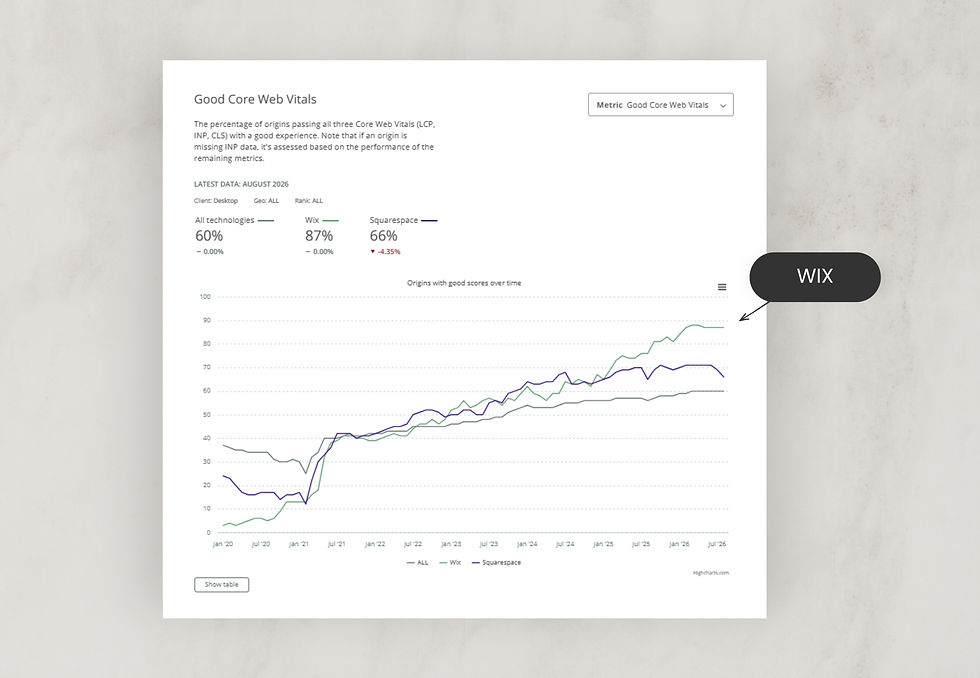
Wix performs well on real-world speed data, with a higher share of sites passing performance tests (Google's Core Web Vitals), and its site history lets you restore an earlier version if something goes wrong.
Squarespace passes performance tests more often than the average website, though it trails Wix, and it has no built-in way to restore an earlier version of your whole site if anything were to go wrong.
Both include managed hosting, SSL and a global CDN, and in practice, how a site is built affects speed more than the platform.
Our take: Both are reliable. Wix has the edge on speed, plus a safety net Squarespace doesn't have.
Selling products online
Wix handles online stores well, from small ranges to larger catalogues, with flexible store layouts, product content and marketing tools. It sits comfortably alongside bookings and services on the same site.
Squarespace suits a small, curated range of products presented simply. Its Basic plan adds a 2% transaction fee on online sales.
For commerce-first businesses that need advanced selling tools, we often recommend Shopify. Read our Shopify vs Wix for eCommerce comparison for the detail.
Our take: Wix for most stores, especially alongside services. Shopify for commerce-first businesses.
Which should you choose?
Choose Wix if:
You want a custom, on-brand look, with more control over layouts, animation and mobile design, and greater design potential overall
You want bookings and payments included in your plan, not added as a separate subscription
You want your website, client management, marketing and automations all in one place
You need a custom build with advanced features, now or as your business grows
You want more control over how your site appears in Google and AI search
You want room to grow without ever needing to change platform
You want more features for a similar price, with a free plan to try it first
Squarespace may suit you if:
You prefer a guided editor that keeps every page neat and consistent, even if it limits your layout options
You need a simple site, like a portfolio, gallery or personal brand site
You don't expect your site to need to grow or change much over time
You're happy paying for a polished look straight out of the box, even if it comes with fewer built-in features
By type of business
Your business | Our pick | Why |
Photographer or artist | Squarespace or Wix | Squarespace or Wix for a gallery-only portfolio; Wix if you also take bookings or sell prints |
Coach or consultant | Wix | Bookings included in the plan, with clients and marketing in one place |
Tradie or local service | Wix | Easy to add and manage a page for every service and suburb |
Health, wellness or beauty clinic | Wix | Bookings, staff and payments included in the plan |
Creative studio or agency | Wix Studio | Custom design and animation that make your work stand out |
Online store | Wix or Shopify | Wix for most stores; Shopify for commerce-first businesses |
Growing SME or team | Wix Studio | Room to grow without changing platform |
Already on Squarespace? Signs it's time to move to Wix
If your Squarespace site isn't keeping up with your business, these are the signs it may be time to move.
It may be time to move if:
You've added services, locations or team members and the site hasn't kept up
You're paying for Squarespace and a separate scheduling, CRM or email tool
You want to grow through SEO, blogging or AI search, and the structure is holding you back
You want a more unique site that goes beyond what a template allows
You'd like more features and flexibility for a similar price, or less if you need bookings
Squarespace may still be enough if:
Your site is a simple portfolio that's already doing its job
You don't plan to add services, bookings or new content
What moving involves: there's no one-click transfer from Squarespace to Wix, so a move is really a rebuild. That's also the opportunity. You can keep your domain, rethink your page structure, set up 301 redirects from your old URLs so you keep the rankings you've earned, and improve the design and content along the way.
If you're not sure whether the platform is the problem, or the structure, content or design, a website audit is a good first step before committing to a rebuild.
Our advice: Why we build in Wix and Shopify, not Squarespace
After years of building on the major platforms, Squarespace included, we now design and build on Wix Classic, Wix Studio and Shopify. We've found they work best for our small business clients, giving the best balance of design freedom, functionality and easy management after launch. And we're not alone in that view: external reviewers consistently rate Wix ahead of Squarespace for most businesses.
Squarespace can be enough for a simple portfolio, personal brand site or small, visually led store. But most businesses need their website to do more over time, and that's where Wix and Shopify give us, and our clients, more to work with. With Wix and Squarespace in much the same price range, that flexibility doesn't cost more, and for businesses that take bookings, Wix Studio usually works out lower.
For service businesses, we recommend Wix Studio, or Wix Classic for simpler sites. Studio lets us build around your brand, structure your services, take bookings and design every page for mobile.
For product businesses, we recommend Wix eCommerce or Shopify, depending on what your store needs. Our Shopify vs Wix for eCommerce comparison explains how to choose.
As a Wix Legend Partner, Wix's highest global tier, and a Certified Shopify Partner, we've launched more than 400 websites for over 450 clients. You can see examples in our project portfolio.
Our approach isn't to push every business onto the same platform. It's to recommend the one that fits what your website needs to do.
Not sure which platform is right for you?
If you're weighing up Wix and Squarespace, or wondering whether your current site is holding you back, a short conversation can save a lot of guesswork. We'll talk through what your website needs to do and which platform and structure will support it.

Get a Website Audit & Business Blueprint
A full AI visibility report, a clear gap analysis, and a prioritised 90-day roadmap — covering your traffic, search performance, content gaps and how you compare to competitors. Action it yourself, or have us implement it for you.
Planning to build or manage your website yourself? Our Website Training can help you make confident platform, structure and content decisions.
Wix vs Squarespace FAQs
Is Wix or Squarespace better for small businesses in 2026?
For most service-based small businesses, Wix is the stronger choice because it offers more design flexibility, more advanced features, included bookings and more room to grow. Squarespace is a good choice for simple, visual websites such as portfolios and personal brand sites.
Is Squarespace easier to use than Wix?
Both are designed for business owners without technical skills. Wix Classic and Wix Harmony are beginner-friendly, and Wix Studio adds more control for professionally designed sites. Squarespace's editor is more guided, which keeps layouts tidy but gives you less room to customise.
Which is better for SEO, Wix or Squarespace?
Both cover the SEO basics well. Wix offers more control as your SEO grows, including structured data settings, built-in keyword tools and an easier way to add service and location pages. Results still depend on how well the site is planned, written and maintained.
Which is better for AI search visibility?
Wix is the stronger foundation. It was one of the first major website platforms to offer native AI visibility tracking, and its flexible page structure and structured data controls make it easier to present clear, well-organised information that search engines and AI tools can understand and cite. Squarespace also offers AI visibility tracking, but with less control over how content is structured.
Is Wix faster than Squarespace?
In recent real-world data from the HTTP Archive Core Web Vitals Technology Report, a higher share of Wix sites pass Google's Core Web Vitals than Squarespace sites. Both platforms are generally fast, though, and how a site is built, including image sizes, video and apps, affects speed more than the platform itself.
Which is better for blogging, Wix or Squarespace?
Both are strong. Squarespace's blogging tools are highly rated by reviewers and suit writers and creatives who publish often. Wix's blog is also capable and connects with its SEO tools, CMS and marketing features, which suits businesses that blog to attract clients and support their SEO.
Is Squarespace or Wix better for booking appointments?
For most service businesses, Wix. Wix Bookings is included in Wix's payment-enabled plans, so appointments, classes, deposits and payments sit in the same dashboard as your website. Squarespace Scheduling is a separate subscription starting from A$20 a month plus GST on annual billing, on top of your website plan.
Which has better customer support, Wix or Squarespace?
Both offer 24/7 support. Squarespace includes it on all plans, and Wix offers 24/7 customer care with priority support on higher plans. Some reviewers rate Wix's mix of help options, including phone support and online courses, slightly ahead.
Is Wix or Squarespace better for ecommerce?
Both suit smaller stores. Wix also handles larger product ranges well, and works especially well when products sit alongside services and bookings. Squarespace suits a small, curated range, but its Basic plan adds a 2% fee on store sales. For commerce-first businesses that need advanced selling tools, Shopify is usually the better choice.
Does Wix cost less than Squarespace in Australia?
It depends on what you need. On website plans alone, the two are similar: Squarespace starts from A$17 a month plus GST, and Wix from AU$18 including GST, billed annually. For service businesses that take bookings, Wix Studio usually costs less, because bookings are included in its payment-enabled plans, while Squarespace Scheduling is a separate subscription.
How much does Squarespace cost in Australia?
Squarespace plans cost A$17 a month for Basic, A$28 for Core, A$49 for Plus and A$109 for Advanced, billed annually, plus GST. Monthly billing costs more. If you want to take bookings, Squarespace Scheduling is an extra subscription from A$20 a month plus GST.
Does Squarespace have a free plan?
No. Squarespace offers a 14-day free trial. Wix has a free plan with no time limit, so you can build and explore before paying anything. It uses a Wix web address, so you'll want a paid plan when you launch.
Can I move my website from Squarespace to Wix?
Yes, but there's no one-click transfer, so it's treated as a rebuild. You can keep your domain and set up 301 redirects from your old URLs to protect your search rankings. It's also a good opportunity to improve your structure, content and design.
Is Squarespace good for photographers and creatives?
Yes. Squarespace's gallery-led templates are a strong fit for photographers, artists and other creatives whose work is the focus. If you also need detailed service pages, SEO content or a more distinctive layout, Wix Studio offers more flexibility.
Should I choose Wix Classic or Wix Studio if I'm leaving Squarespace?
It depends on the site. Wix Classic suits simpler websites you plan to manage yourself. Wix Studio suits custom, professionally designed websites that need precise mobile layouts, advanced features or more room to grow.
Recommended reading
Best Website Builder for Small Businesses in 2026. Compare Wix, Shopify, Squarespace, GoDaddy and WordPress side by side.
Wix Pricing in Australia. What each Wix plan costs and which one your business needs.
Wix Classic vs Wix Studio. If you know you want Wix but not which editor.
Search Is Changing: What Google's AI Updates Mean for Small Businesses. Why structure and clarity matter more than ever.
The Ultimate Guide to Launching Your Website: DIY vs Hiring a Designer. The real costs and trade-offs of each route.


